
Hello everyone and welcome to another article from Tech Advice. With Black Friday/Cyber Monday and Christmas getting ever closer you may be trying to decide what to get for either yourself or someone else. Today I am going to look at eight computer accessories you may not be as aware of that might make a nice little gift for someone, or to go with your new computer.
External DVD Player:
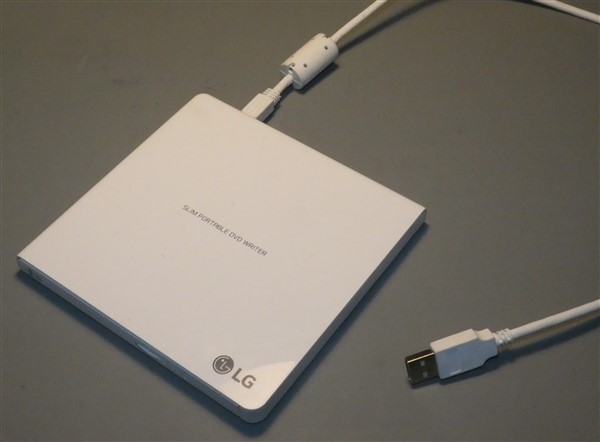
The first accessory that may come in handy is an external DVD player. These DVD players are more useful than ever now that most laptops do not have disc players. The DVD player connects to your computer using a USB cable which means you will need to place both on a flat surface. This unfortunately makes using it with a laptop less appealing if you want to use it while travelling. You could pair it with a large lap desk but even that defeats the point of a laptop in my opinion.

Network/Bluetooth Adapter:
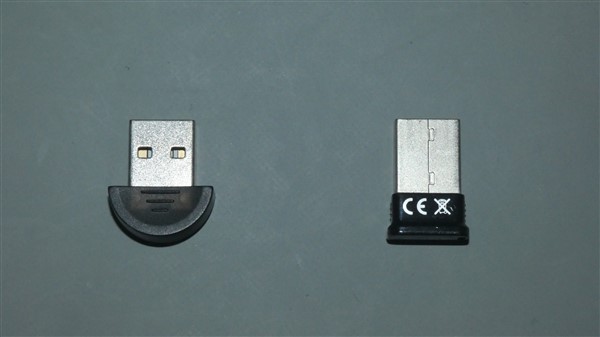
The next accessory is only useful for older computers (10+ years) and that is a network/Bluetooth adapter. These small USB devices can really help keep an older computer going and they usually cost no more than €20. They allow older devices to connect to Wi-Fi networks and more expensive ones also allow Bluetooth connections.
Biometric Scanner:
A few weeks ago, I wrote about signing into Windows without a password, in that article I suggested using either a fingerprint scanner or a facial recognition webcam. If your computer doesn’t support either of them, you can buy them separately. A fingerprint scanner takes the form of a small memory stick with a scanner on the side that connects to your computer. A facial recognition webcam is a little trickier to find as they look the same as a regular one, to identify them look for “Windows Hello compatible” in the description. A fingerprint scanner can be bought for between €20-€30, while a Windows Hello webcam can vary in price but are unlikely to be less than €50.

High-End Webcam:
If you are thinking of getting a webcam for facial recognition it may be a good idea to get one that is equally good for Zoom calls. Higher-end webcams boast features such as higher resolutions, built in microphones, and built-in lights for darker rooms, some even come with mini tripods to you can put it on a desk or shelf. These kinds of webcams can be expensive depending on how many extra features you want. Expect to pay anywhere from €80 and higher for one.
Laptop Dock:
For laptop users, especially those working from home, a dock may be useful. These are essentially large and powerful computer hubs with a wide variety of different ports. The user plugs the dock into their laptop using a USB-C cable giving them the option to use more USB and display ports such as VGA and HDMI. In a work environment this could be used to connect a second monitor and a number memory sticks to the laptop simply by plugging in one cable. Docks come in many shapes and sizes with price being determined by brand, the number of ports, and the complexity of those ports. Be prepared to spend at least €50-€100 for a good one.
Laptop Tray:
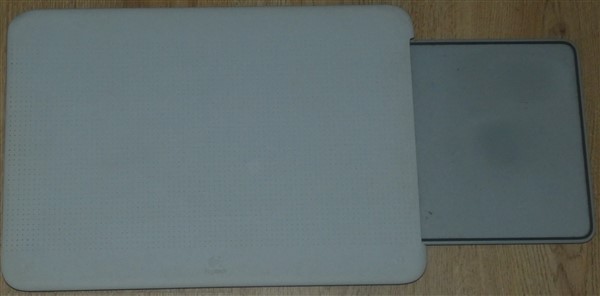
If you like to use your laptop on, well, your lap, then it may be worth getting a laptop tray. There are many types out there, from wooden ones with legs, to ones with a cushion on the lap side, and plastic ones with a pull-out mouse pad. If you use a laptop for extended periods of time or on a bed a tray will stop the heat from the laptop causing discomfort and prevent any dust getting into the laptop. They have become so common that many shops sell them, from computer shops to Aldi and even the Book Centre. Just be careful that they are the right size for your laptop.
Desktop PC Trolley:
If you use a desktop PC especially a heavy one, you can get a special, adjustable trolley for it consisting of four wheels and an adjustable base. These trollies help to keep it off the floor which improves air flow, it also makes it easier to move the machine for maintenance or cleaning. Desktop trollies can be purchased for between €20-€30, IKEA and Amazon are two retailers that sell them.
Conclusion:
Thank you for reading this article and remember that Tech Advice provides a Buying Advice service for €15 an hour if you need more specific help in finding a piece of technology. As always post any feedback or suggestions for future topics in the comments below or on Facebook.
 Tech Advice