
Laptop with a wrench coming out of it

Computer First Aid

Hello and welcome to this year’s first Tech Advice blog article. Today I want to give a few “first aid” tips for when things go wrong, or an accident happens when using your computer/laptop. Computer Behaving Strangely? Let’s start with an easy one. If your computer is behaving strangely such as applying updates constantly, software not loading properly, or just not behaving as it normally … Continue reading Computer First Aid

Laptop with Windows 10 intalled

Settings of Note in Zoom

Welcome to another Tech Advice blog article. Today I want to follow up last week’s article on using Zoom, by highlighting some options in Zoom’s settings that might improve your experience. To start, open Zoom’s settings by clicking the small cog symbol in the top right corner. The first setting is under “Video”. In this category, look at the options under “My Video”. The “Touch … Continue reading Settings of Note in Zoom

Smartphone

5 Things to do with an Old Smartphone

Hello and welcome to the latest Tech Advice blog article. As happens every year, a new catalogue of smartphones from giants such as Apple and Samsung have either been released or launched by now. This meaning that either some of you have bought them or are planning on buying last year’s version during the Black Friday sales. As a result, you either have, or will … Continue reading 5 Things to do with an Old Smartphone

Facial Regocnition Scan

Signing in to Windows without a Password

Hello and welcome to another Tech Advice blog article. Today’s article was inspired by recent reports that Microsoft wants to make passwords a thing of the past when logging into Microsoft devices and accounts (News article from The Verge). This does not include PIN numbers that can also be used to log into Windows computer as a backup. The reasoning behind this is that passwords … Continue reading Signing in to Windows without a Password

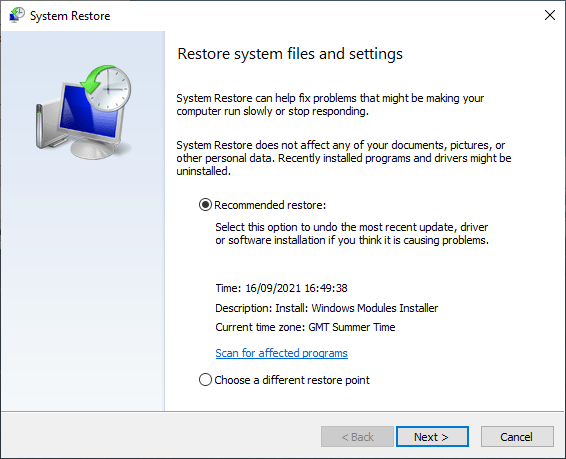
Choosing a restore point

Using Windows 10 or RAID to Backup your Data

Hello and welcome to the next article in my series on backing up your data. Today I am going to look at two software/hardware hybrid solutions. The first one is slightly complicated but does not require much knowledge other than what I present here. The other is fairly complicated from a hardware perspective. The first method is built into Windows and is called System Restore. … Continue reading Using Windows 10 or RAID to Backup your Data